


Direct answer
Professional alarm monitoring is generally better for owners who want eligible alarm signals received by a staffed center under a defined procedure when they are unavailable. Self-monitoring sends alerts to the owner or designated users and can be appropriate when those people can sustain the response responsibility. The choice is not simply “subscription or no subscription”: ask who receives the signal, what information arrives, what happens when contacts do not answer and which functions survive an outage.
Compatible alarm systems can also integrate with home automation, making the result simpler to operate than a collection of unrelated keypads and apps. The important word is compatible. The alarm panel, sensors, siren, communications and monitoring service perform a different job from the automation platform that presents status, runs scenes and coordinates other systems. For the wider decisions about cameras, locks and DIY versus professional systems, use Camelback Smart Homes’ home security planning guide.
For an Arizona home with a gated drive, detached garage, casita, household staff or long periods of seasonal occupancy, that distinction matters. The design should explain what detects an event, what transmits it, who evaluates it, what can be automated safely and what remains available during an internet or utility outage. A reliable answer is a documented chain—not a claim that everything “works together.”
What a professionally planned home alarm system includes
Home alarm systems are more than wall keypads. Each is a sequence of components and decisions that turns a physical condition into a local warning, an owner notification, a monitoring event or a request for help. Each link needs a defined owner and a known failure behavior.
| Layer | Typical job | Planning question |
|---|---|---|
| Detection | Door/window contacts, motion, glass-break and other purpose-selected sensors report a condition. | Is each device appropriate for the opening, room, pet activity, temperature and expected use? |
| Control | The alarm panel evaluates zones, applies arming logic, supervises supported devices and circuits when configured, and operates local annunciation. | Which functions remain local if cloud service or home automation is unavailable? |
| Communication | Supported IP and/or cellular paths transmit eligible events off-site. | Which path is primary, which is backup, and how is a failed path reported? |
| Monitoring | A monitoring center receives supported signals and follows the account’s verification and response instructions. | Which signals are monitored, who is called, and what happens if nobody answers? |
| Automation | A supported driver can expose status and coordinate selected lights, locks, camera views, shades or climate actions. | Which commands are allowed, and can the alarm still do its core job without this layer? |
| Operations | Codes, permissions, training, testing, battery service, contact lists and documentation keep the system usable. | Who maintains it after handoff, during travel and when household personnel change? |
A useful proposal names the zones and response intent instead of selling a sensor count. A primary entry, glass wall, interior hallway, garage door and distant vehicle gate do not present the same conditions. For large properties, also map how a remote sensor, receiver, panel, network device and gate controller communicate across buildings.
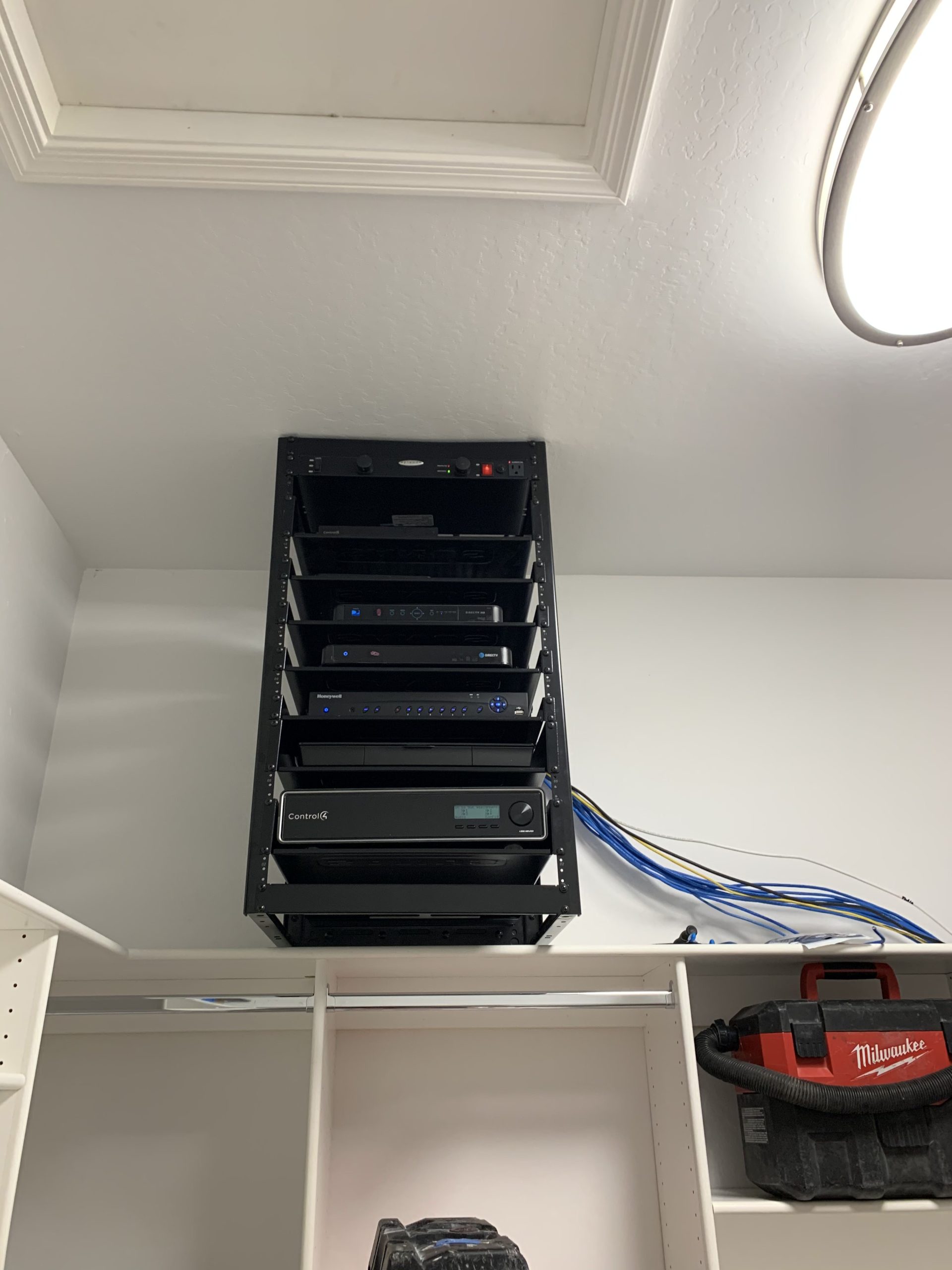
Professional monitoring vs. self-monitoring
Monitoring is a response workflow, not merely a notification setting. With self-monitoring, an owner or designated user receives the alert, interprets it and decides what to do. That can be appropriate when the household can reliably keep phones available, understand the signals and act during travel, sleep, meetings or a connectivity problem.
Professional monitoring routes eligible alarm signals to a staffed monitoring center under the account’s procedures. UL Solutions describes monitoring stations as entities where trained operators receive signals and initiate an agreed response; it also notes that service and reliability can vary. Ask who operates the center, whether it is UL Listed for the applicable service category, which signals it receives, and how it handles degraded communications.
| Decision | Self-monitoring | Professional monitoring |
|---|---|---|
| First recipient | Owner or designated users | Staffed monitoring center for eligible signals |
| Response burden | The user notices, interprets and acts | The operator follows the account procedure, subject to service and local rules |
| Availability risk | Muted phone, poor service, travel or uncertainty can delay action | Monitoring-path, account-data and provider procedures still need verification |
| Best-fit question | Can the household sustain this responsibility every day? | What exactly will the center do for each signal type? |
Monitoring is not a response guarantee. Detection, transmission, operator assessment, verification, a dispatch request and responder arrival are separate stages. The contract and local policy determine the process; no alarm design can promise a particular emergency outcome.
Ask these questions before activating service
- Which burglary, panic, supervisory and trouble signals reach the monitoring center?
- Does the panel use IP, cellular or a supported dual-path arrangement, and how is loss of either path reported?
- What verification or enhanced-confirmation procedure applies to ordinary burglary alarms?
- Which events are exceptions, and how are panic, duress, smoke or CO signals handled?
- Who appears on the call list, in what order, and who can cancel an accidental alarm?
- Who updates the permit number, property notes and responsible-party information?
Wired, wireless or hybrid alarm sensors?
None of these architectures is automatically superior. Existing wiring, construction access, distance, finish sensitivity, radio conditions, battery access and long-term serviceability determine the right mix. A professionally planned retrofit often reuses sound, testable wiring and adds wireless devices where opening walls would be disproportionate. A new build can reserve cable and power paths before finishes close; Camelback Smart Homes’ low-voltage pre-wiring guidance explains why those decisions belong before drywall.
| Architecture | Strengths | Design cautions |
|---|---|---|
| Wired | No sensor radio battery at many endpoints; predictable pathways; attractive when good cable already exists or walls are open. | Cable condition and zone mapping must be verified. Retrofit access, concealed damage and future service paths matter. |
| Wireless | Lower-disruption placement where cabling is impractical; flexible for selected finished spaces. | Battery maintenance, signal strength, receiver coverage, interference and device environmental ratings still apply. |
| Hybrid | Can retain dependable existing zones while adding supported wireless devices for new openings, remote spaces or renovation changes. | The panel, receiver capacity, device compatibility and documentation must cover both systems as one design. |
Pet-aware motion sensing still has limits. An animal’s size, height, movement path and access to furniture can change what a detector sees. Direct sun, supply-air movement, heat sources and an unstable mounting surface can also matter. Follow the exact manufacturer instructions, test the installed scene and use perimeter contacts where they better match the objective.
In Phoenix-area garages and equipment spaces, heat and dust deserve explicit review. Do not assume a panel, receiver or battery belongs in an unconditioned location because it physically fits there. Verify every component’s published environmental limits and provide reasonable service access.
What happens when the power or internet goes out?
The answer should be written down component by component. A panel battery may keep the alarm panel and its communicator operating for a limited, tested period. It does not automatically power the internet provider’s equipment, router, network switches, Wi-Fi access points, cameras, recorder, automation controller, gate operator or intercom. For home alarm systems, cellular alarm backup is a communications path—not backup internet for the property. The focused FAQ on camera and alarm outage behavior separates those dependencies at a glance.
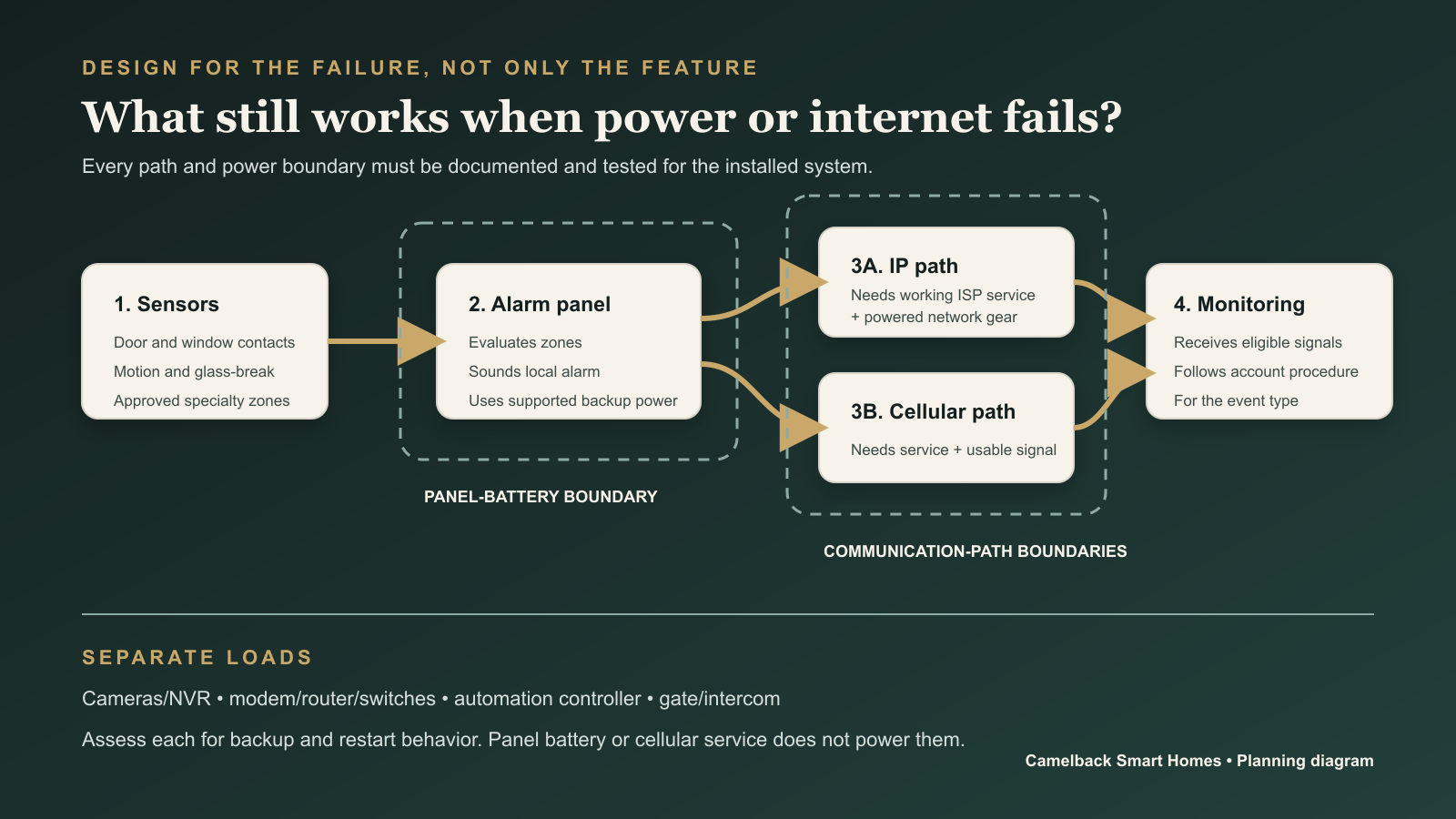
Follow the complete dependency chain
- A sensor changes state. Confirm whether the sensor, any repeater and its receiver remain powered and supervised.
- The panel evaluates the zone. Confirm battery condition, connected load, local siren behavior and low-battery reporting.
- A signal leaves the property. IP needs working ISP service and powered on-premises network equipment; cellular needs an active service, compatible communicator, usable coverage and panel power.
- The monitoring center receives the eligible event. Confirm what information arrives and which procedure applies.
- Other systems add context or action. Cameras, recorder, lighting control, automation interfaces and a gate may need independent backup and restart plans.
Runtime is never a universal product promise. It changes with battery capacity and age, connected devices, temperature, signal conditions and the operating state during an alarm. Some listed applications have specific standby requirements, but those requirements do not make every accessory or every residential system identical. One current DSC IQ Pro compliance guide, for example, specifies different standby periods and battery/load combinations for UL residential burglary versus fire and home-health applications. It also calls for backup power for on-premises network equipment when an IP path is used in the cited compliant fire configuration. That product-specific example shows why “24-hour backup” is not a universal claim. Ask for the proposed runtime assumptions, the loads included, the battery replacement interval and a test record.
A UPS can keep selected low-voltage network or recording equipment operating through a short disruption, but it must be sized to the measured load and intended runtime. Generator-backed circuits may extend availability when a property already has a properly designed generator strategy. Electrical changes and generator integration belong with qualified professionals; an alarm article is not a wiring plan. The distinction between stored energy and supported runtime is also covered in the battery-backup definition.
How to reduce false alarms and alert fatigue
False-alarm reduction starts before programming. The sensor must match the condition, the mounting location must follow its instructions, the zone label must be understandable, and every authorized person must know the entry, exit and cancellation procedure. Depending on the camera and analytic configuration, camera alerts need a separate tuning process so wind-blown plants, pool reflections, insects, headlights and routine service traffic do not become a wall of ignored notifications.
The City of Phoenix false-alarm program identifies common residential causes such as incorrect keypad codes, untrained users, unsecured openings and failure to cancel through the monitoring facility. Scottsdale’s current alarm guidance similarly emphasizes training, updated user and contact information, pet and remodeling changes, cancellation procedures and inspection of door/window sensors. Camelback Smart Homes’ supporting answer on reducing false alarms and excessive camera alerts remains the short troubleshooting reference.
False-alert prevention checklist
- Give each family member, house manager, housekeeper and regular contractor an individual code or credential when supported; remove access promptly when a role ends.
- Use plain-language zone names such as “east casita patio door,” not an unlabeled number.
- Verify that doors and windows close consistently and that contacts remain aligned after seasonal movement or construction.
- Review detector placement when furniture, curtains, decorations, fans, pets or room use changes.
- Keep monitoring contacts, phone numbers, responsible parties and property instructions current.
- Teach every authorized user how to cancel an accidental alarm through the correct channel and what information is required.
- Place the system in its provider-approved test mode before authorized service, sensor testing or renovation work when that function is available.
- Tune camera activity zones, schedules and event classes from real day, dusk and night footage; do not rely on default settings.
- Replace or service batteries on the manufacturer- or provider-documented schedule and respond to low-battery trouble conditions instead of silencing them.
- Re-test monitoring, notifications and restart behavior after network, panel, ISP, gate or automation changes.
Modern confirmation tools can add context, but they do not eliminate judgment or guarantee cancellation. ANSI/SIA CP-01-2019 defines control-panel features intended to reduce false alarms. TMA CS-V-01–2021 defines Enhanced Confirmation options that may include multiple attempts, audio, video or multiple zone trips. The procedure remains event-, provider- and jurisdiction-specific. Ask what the selected monitoring center and local authority actually support; do not assume every burglary, panic, duress or fire signal follows the same sequence.
How alarm systems can integrate safely with home automation
A supported connection can make the alarm system easier to live with. Control4’s current homeowner guidance, for example, describes security-panel controls, sensor status, locks, alerts and camera viewing while cautioning that capabilities vary by the customized installation and software release. The practical lesson applies across platforms: verify the exact panel, interface, driver and version rather than relying on a platform logo. For the concise answer, see how security can integrate with whole-home automation.
Useful, bounded automation examples
Where supported and deliberately configured, examples may include:
- Leaving: an Away scene can arm the appropriate mode, turn off selected lights and entertainment, adjust climate, and report any opening that prevents arming.
- Alarm event: designated lights can turn on, entertainment can pause, selected camera views can appear, and approved users can receive a clear notification.
- Arrival: a named credential can disarm only if the supported security workflow allows it, then run a user-specific welcome scene.
- Seasonal-property status: the interface can summarize armed state and relevant trouble conditions, while monitoring and alarm transmission remain panel functions.
- Gate visitor: an intercom can present video and two-way audio before an authorized user issues a deliberate release command.
Keep higher-risk commands deliberate. Do not automatically disarm an alarm, unlock a door or release a vehicle gate solely because a camera analytic, geofence or voice routine inferred that someone belongs there. Require appropriate authentication and preserve the gate operator’s independent safety, egress and emergency-release behavior.
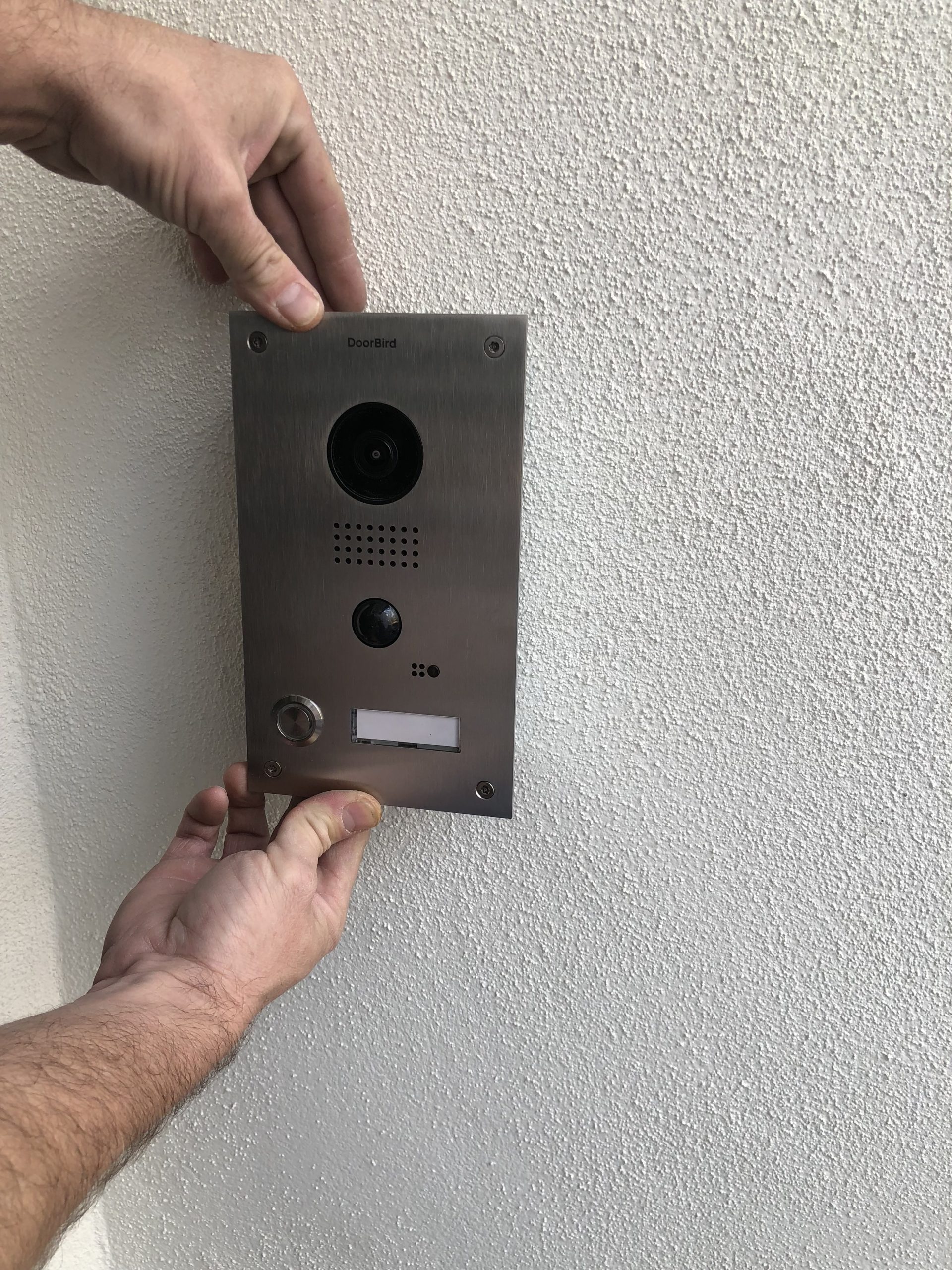
The broad choices around cameras, locks and DIY versus professional installation belong in Camelback Smart Homes’ professional vs. DIY home security guide. This guide stays focused on the alarm panel, monitoring, resilience and the boundary between security and automation.
Smoke and carbon monoxide are life-safety systems, not convenience scenes
Smoke and CO detection may be integrated or monitored only when the selected equipment, provider, installation and jurisdiction support it. Do not assume that a consumer sensor, an app notification or an automation scene satisfies fire-code or listing requirements. The alarm proposal should identify which devices are code-required, which are supplemental, what is interconnected, which signals are monitored and who is responsible for inspection and testing.
The U.S. Fire Administration recommends smoke alarms inside every bedroom, outside each separate sleeping area and on every level; alarms should be interconnected, tested monthly and replaced 10 years from the manufacture date, subject to manufacturer instructions and local code. Never disable a smoke alarm to solve nuisance alarms. The U.S. Consumer Product Safety Commission advises CO alarms on each level and outside sleeping areas, with installation and maintenance following product instructions. Always confirm current local code and the authority having jurisdiction.
Phoenix, Scottsdale and Paradise Valley alarm permits
Alarm rules follow the actual jurisdiction—not the city printed in a mailing address. That is especially important around Scottsdale and county-island boundaries. The table below was checked against official municipal sources on September 10, 2026; fees, forms and response policies can change, so use the linked authority immediately before activation.
| Jurisdiction | Current official guidance | Homeowner action |
|---|---|---|
| Phoenix | The city says a permit is required for monitored and unmonitored alarm systems and publishes separate burglar/fire false-alarm information and possible assessments. | Review the current Phoenix permit page and false-alarm program; retain the permit record and current responsible-party information. |
| Scottsdale | The city says all alarm users within Scottsdale city limits need an annual permit and that an application is due within 10 days after the system becomes operational. Its page currently lists a $10 application fee and $10 renewal fee. Scottsdale Ordinance 4624 also requires current ANSI/SIA CP-01-listed alarm-control panels, false-alarm reduction programming and rechargeable backup power for systems within its scope. | Confirm city limits with Scottsdale’s address tools, then use the official alarm-permit page for current fees, activation charges, forms and cancellation instructions. |
| Paradise Valley | The Town’s current FAQ says residents no longer register a home alarm system. The Town separately offers an optional police alarm-monitoring program with its own enrollment information. | Check the Town’s alarm FAQ and monitoring-program page; verify account eligibility, equipment compatibility and current false-alarm procedure. |
Other Valley cities and unincorporated areas may follow different rules. The installing or monitoring company should explain the process, but the property owner should know who is responsible for applying, renewing, updating contact details and documenting the permit number. Camelback Smart Homes’ supporting Phoenix and Scottsdale alarm-permit FAQ is the concise reference; the municipal pages remain authoritative.
Alarm system installation, commissioning, maintenance and handoff checklist
A dependable alarm system installation should be understandable to the people who live with it and serviceable by the professionals responsible for it. Before sign-off, request a project-specific record that covers:
- Zone list with plain-language names, device type, location and intended response
- Panel, communicator, receiver and interface model/version information
- Primary and backup communication paths, supervision and failure notifications
- Battery and UPS inventory, supported loads, runtime assumptions, installation dates and replacement plan
- Monitoring-center name, account procedure, call list and current responsible parties
- Permit status and the exact jurisdiction responsible for the property
- Named user codes and roles, with a documented process for adding and removing access
- Entry, exit, stay, away, night, panic, duress and cancellation training as applicable
- Supported automation commands, data direction, authorization limits and behavior when the controller is offline
- Recorded tests for each zone, local annunciation, monitoring receipt, internet loss, AC loss, low battery and restoration
- Seasonal-residence instructions for house managers, service providers and emergency contacts
- Service contact, maintenance interval, warranty records and a change log for future work
For homeowners comparing the complete security stack, review Camelback Smart Homes’ Security & Monitoring services, security FAQ library, interactive home-security planner and whole-home automation approach.
A system designed around your property
Discuss an integrated alarm and monitoring plan.
Camelback Smart Homes can map the zones, users, monitoring path, outage dependencies and supported automation for your Phoenix, Scottsdale or Paradise Valley home—then document how the system should behave on an ordinary day and during a failure.
Sources and technical references
Use the organizations responsible for a product, platform or standard to confirm current specifications and compatibility.
- UL Solutions — Central Station Service Certification
- Security Industry Association — ANSI/SIA CP-01-2019
- The Monitoring Association — TMA CS-V-01–2021
- Johnson Controls — DSC IQ Pro UL/ULC compliance guide
- Control4 — Security basics
- City of Phoenix — Burglar and Fire Alarm Permit Application
- City of Phoenix — Preventing False Alarm Systems
- City of Scottsdale — Alarm Permits
- City of Scottsdale — Ordinance 4624
- Town of Paradise Valley — Alarm Monitoring FAQ
- Town of Paradise Valley — Alarm Monitoring
- U.S. Fire Administration — Smoke Alarms
- U.S. Consumer Product Safety Commission — CO Alarms
How this answer was prepared
Camelback Smart Homes publishes this FAQ library for homeowners, design professionals, builders and property teams comparing integrated technology. Answers begin with the practical conclusion, then explain the factors that can change it.
Limitations: This is general educational information, not a site-specific design, quote, code determination or compatibility guarantee. Final requirements depend on the property, construction, infrastructure, equipment versions and project goals.